
Synopsis
When testing Email Health using MX Toolbox on a WHM hosted domain, you may get 3 false positives:
 |
smtp | server.example.com | Reverse DNS does not match SMTP Banner |  More Info More Info |
|
smtp | server.example.com | Warning – Does not support TLS. | More Info |
|
smtp | server.example.com | 15.077 seconds – Not good! on Transaction Time | More Info |
Your server is fine. The settings are nonsense. MX Toolbox is being blocked by a security feature in WHM Exim and therefor spits out the wrong information. The workaround is to allow the MX Toolbox server to query your WHM server without delay by adding to Greylisting. Whitelist these IP addresses by “Trusted Hosts” one entry per line:
18.205.72.90 MX Toolbox #1
18.209.86.113 MX Toolbox #2
52.55.244.91 MX Toolbox #3
We’ll update this list as new IP addresses are reverse engineered, or contact us, and we’ll gladly add it to this article.
WHM Exim Delay Settings
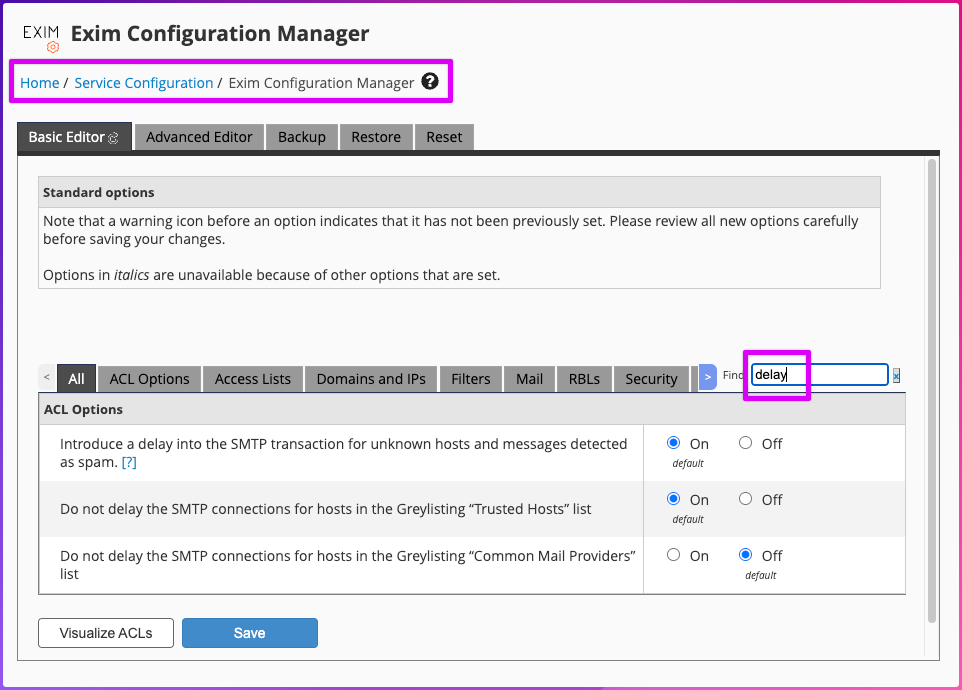
For the curious, the WHM Exim settings that control this awkward behavior is:
Rate Limiting Issue
If you run Email Health against the same server repeatedly, WHM might kick in with the following rate limiting message, and so in spite of you already have whitelisted the IP address, you’ll still see problems:
2023-02-13 15:04:58 H=keeper-us-east-1d.mxtoolbox.com [18.209.86.113]:29112 temporarily rejected connection in "connect" ACL: "Host is ratelimited due to multiple failure only connections (5.7/1h max:5)"