
Symtoms
This problem only happens on busy servers. It may or may not be preceded by these events:
root@server:~# cat /opt/cpanel/ea-php82/root/var/log/php-fpm/php-fpm/error.log | grep -i rais

[16-Dec-2025 07:57:06] WARNING: [pool siteone_com] server reached max_children setting (10), consider raising it
[16-Dec-2025 15:43:47] WARNING: [pool sitetwo_com] server reached max_children setting (15), consider raising it
Randomly, perhaps once or twice a month, or even more aggressively, Apache completely stops serving sites. No obvious errors, except web sites aren’t loading anymore. From HTTP monitoring some key sites we can deduce it’s PHP 8.3, or whichever version websites.
One could say “but just raise the pool”, however, this is shared hosting, and just randomly assigning more resources to a single website will take away from the rest of the system. So actually one has to try and determine WHY this happens.
Try this:
tail -f /opt/cpanel/ea-php83/root/var/log/php-fpm/error.log
Then do this:
systemctl restart ea-php83-php-fpm
You can see in top – no more FPM processes. Check all other FPM running:
systemctl status ea-php81-php-fpm
systemctl status ea-php82-php-fpm
systemctl status ea-php84-php-fpm
Or do it the cPanel way:
/scripts/restartsrv_cpanel_php_fpm --status
cpanel_php_fpm (php-fpm: master process (/usr/local/cpanel/etc/php-fpm.conf)) is running as root with PID 3074081 (systemd+/proc check method).
Do this check too to confirm. Apache should be running:
service httpd status
The quick fix is to get it running again. cPanel will detect it’s offline but only after 5 or 10 minutes when the damage is already done.
service httpd restart
Boom! Everything will start working because restarting httpd will also restart all the FPMs.
Since this problem happens very infrequently it’s really hard to track, but here are some methodologies we’ve tried to eliminate the problem, use cat with egrep
cat /opt/cpanel/ea-php83/root/var/log/php-fpm/error.log | egrep -i "error|warning|raising"
Looks carefully for events like this:
[10-Dec-2025 08:02:38] WARNING: [pool sitename_com] child 3513595 said into stdout: "FacebookAds\CrashReporter : Enabled"
[10-Dec-2025 08:02:53] NOTICE: [pool sitename2_com] child 3513405 exited with code 0 after 41.860367 seconds from start
This will only give you a vague clue as ideally you want FPM process service monitoring.
Next, look for these events:
[10-Dec-2025 08:38:14] WARNING: [pool siename3_com] server reached max_children setting (8), consider raising it
WHM -> MultiPHP Manager -> Click edit
The children started at 5 but we upped them first to 8 and then to 10.
- Audit PHP FPM in WHM make sure all is consistent. Often sites are or aren’t on FPM and maintaining consistency is key is running scalable environments.
- Next there are two logs file indicating possible problems:
/var/log/apache2/error_log- look for
The timeout specified has expired - When FPM stops working, you’ll have a flurry of these in Apache’s log
- look for
/opt/cpanel/ea-php83/root/var/log/php-fpm/error.log- Check for general errors. You might see
server reached max_children setting (5) - Do you want to change this? I would recommend NO before a thorough investigation! You have to consider load on the server and why some websites are using disproportional resources.
- Check for general errors. You might see
- The place to change max_child is MultiPHP Manager’s PHP-FPM default settings:
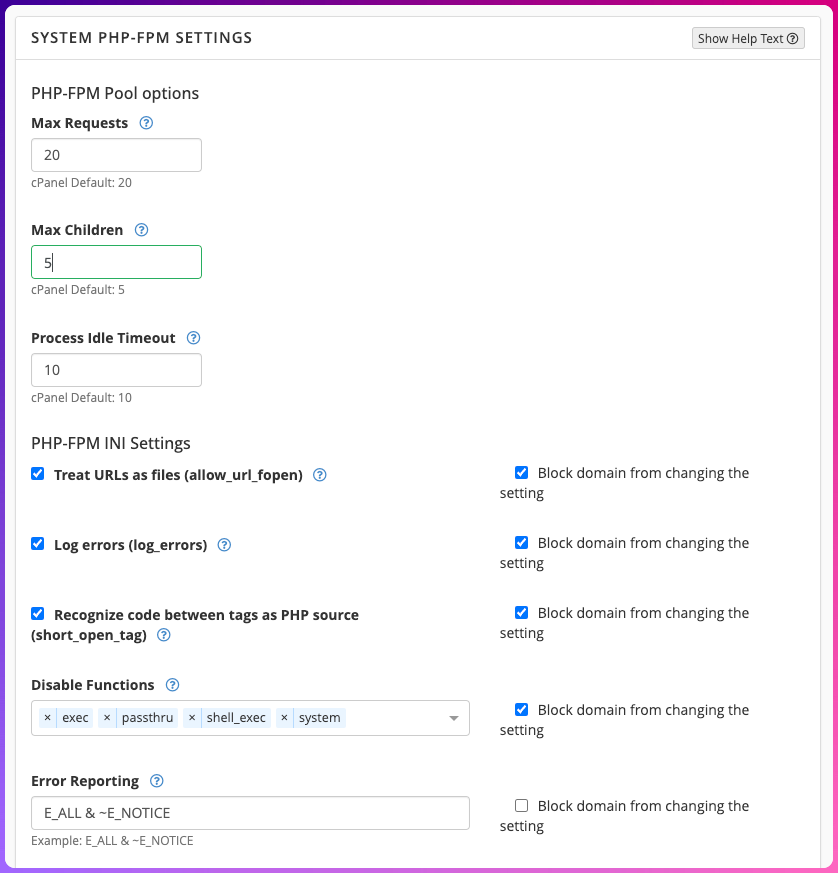
Other things we’ve tried in the isolation process without and breakthroughs:
dmesghoping to find something like OOM. Couldn’t, and server has 20 GB RAM.journalctl -u ea-php83-php-fpm --since "00:00" --until "23:59"- Interesting command but didn’t find anything of use
References
- https://support.cpanel.net/hc/en-us/community/posts/20133055347607-I-need-to-change-max-children-setting-but-php-hpm-conf-file-can-t-be-found-on-server?page=1#community_comment_32506354934935
- https://support.cpanel.net/hc/en-us/articles/360057903134-proxy-fcgi-error-errors-when-using-PHP-FPM
- https://support.cpanel.net/hc/en-us/community/posts/19137373573911-Apache-crashing-when-using-PHP-FPM